 Zinn® Agents
Set the chat agent's name, greeting and colour
Give the agent its name, first message, answering style and brand colour, and choose where it may appear.
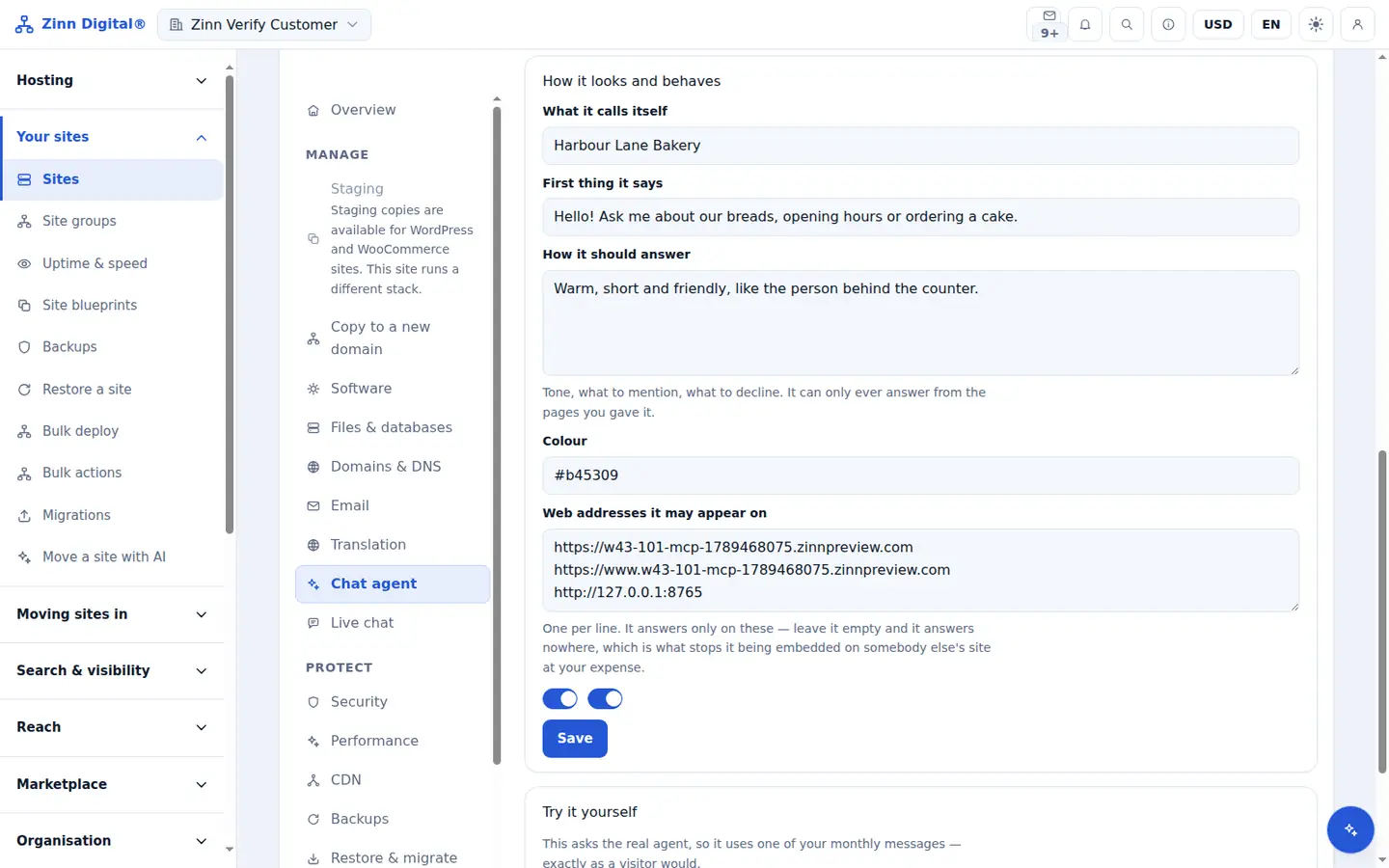
Step by step
Name it
Under How it looks and behaves, enter What it calls itself, up to 64 characters.
Write the greeting
Enter the First thing it says when a visitor opens the chat, up to 280 characters.
Describe how it should answer
Use How it should answer for tone and style, for example short and friendly. It changes how answers are written, never what they are based on.
Set your colour
Enter your brand Colour as a hex value. It is used for the launcher, the header, the send button and the visitor's messages.
List the web addresses
Under Web addresses it may appear on, enter up to 20 addresses where the agent may answer. Your site's own domains are already listed.
Save
Save the settings. The next visitor who opens the chat sees them.
Included with Zinn Digital® hosting
Host with us and the AI comes with the account
Every Zinn Digital® hosting account includes the MCP server, the Ask Zinn® assistant and the AI migration agent at no charge, plus a one-time welcome credit for the site builder. On our servers, the chat agent reads a static site straight from its files and installs itself on WordPress.