 Zinn® Agents
Choose what the chat agent reads
Add your hosted pages, a website crawl or your own text as sources, and read them again when your site changes.
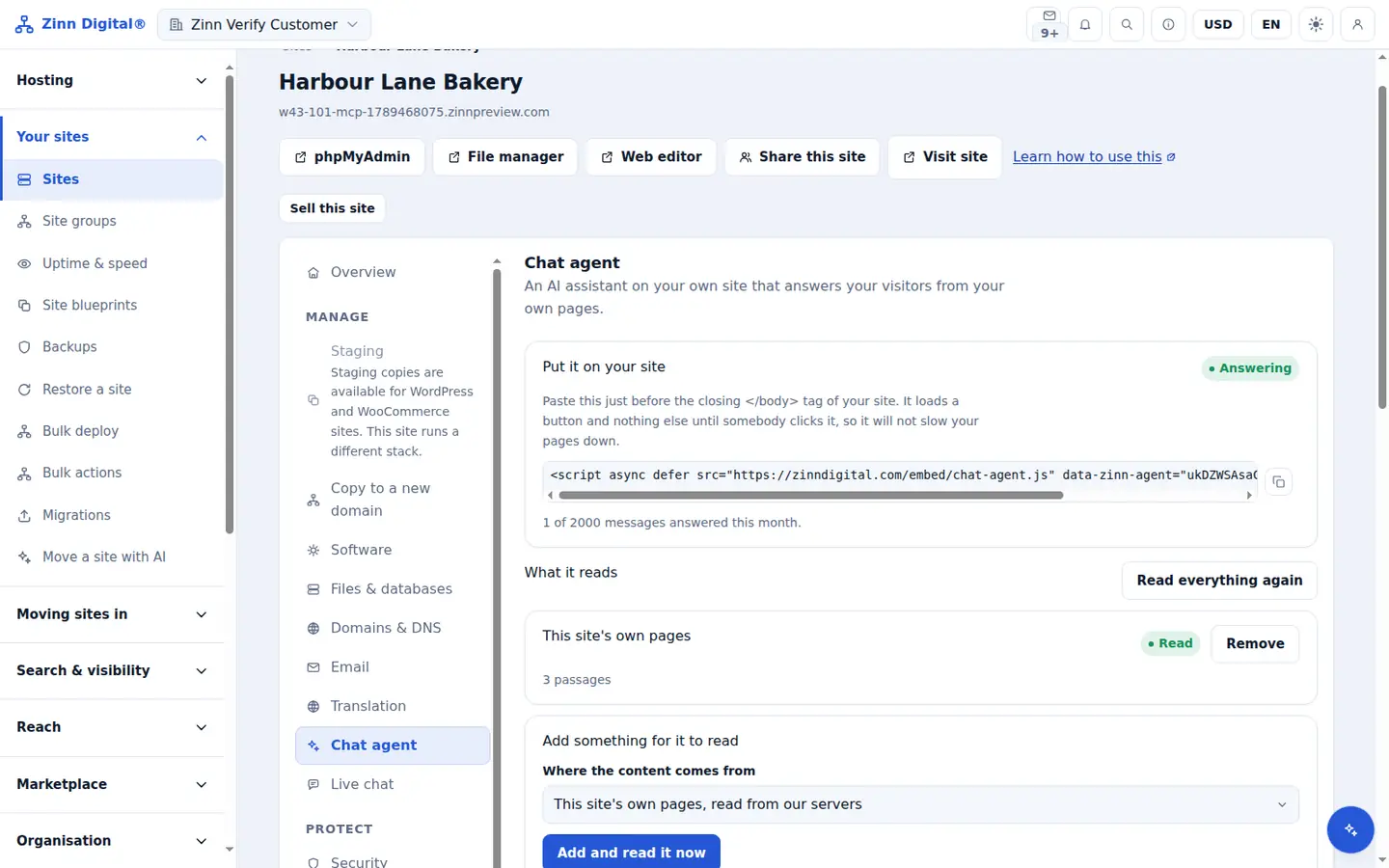
Step by step
Open the sources list
In the site's Chat agent section, find What it reads.
Add this site's pages
Under Add something for it to read, choose This site's own pages, read from our servers. A static site is read from its files; WordPress and other applications are read from the home page and every page in the sitemap.
Add a website crawl
Choose A website, fetched page by page, enter the Address to start from and choose Add and read it now. It follows links on the same host, up to 120 pages.
Add your own text
Choose Text you write yourself for facts your pages do not state, such as returns rules or holiday hours.
Read everything again
After you change your site, choose Read everything again so the agent answers from the current pages.
Included with Zinn Digital® hosting
Host with us and the AI comes with the account
Every Zinn Digital® hosting account includes the MCP server, the Ask Zinn® assistant and the AI migration agent at no charge, plus a one-time welcome credit for the site builder. On our servers, the chat agent reads a static site straight from its files and installs itself on WordPress.